Case Study: HR System - Active Directory Integration

2025. | Reading Time : 20 mins

Designed a no-code Workday-to-Active Directory integration via Aquera, simplifying setup, mapping, and sync for IT admins with agentic AI guidance

Heads up!. This case study is a bit lengthy. I share a lot about my approach and design thinking. The Navigation below will help you jump to sections

Overview

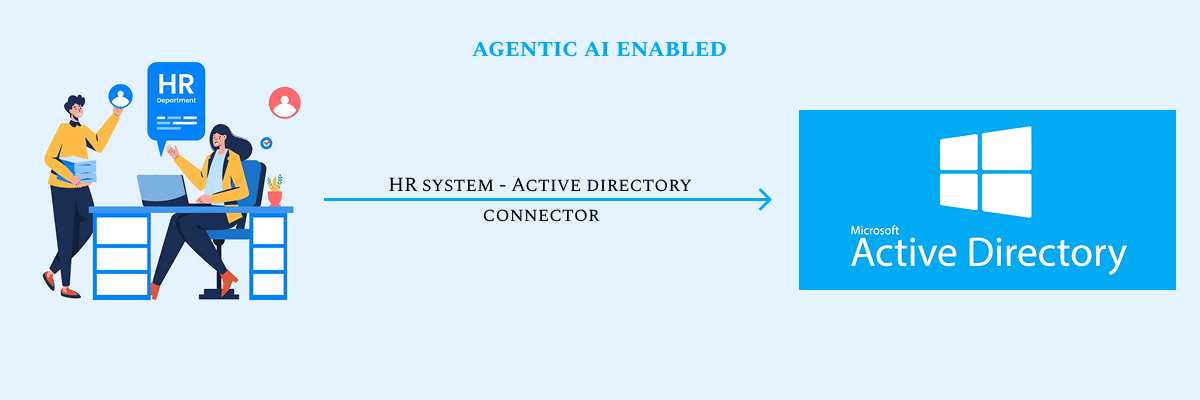
This project delivers a user-friendly, no-code integration for connecting Workday to Active Directory via Aquera. Tailored for IT admins, It simplifies secure connections, field mapping, filtering, and sync scheduling, with agentic AI and automation to boost efficiency, reduce errors, and ensure a transparent data sync process.

  • Designed a no-code integration experience to connect Workday with Microsoft Active Directory via Aquera.

  • Targeted IT administrators with a focus on usability, clarity, and control.

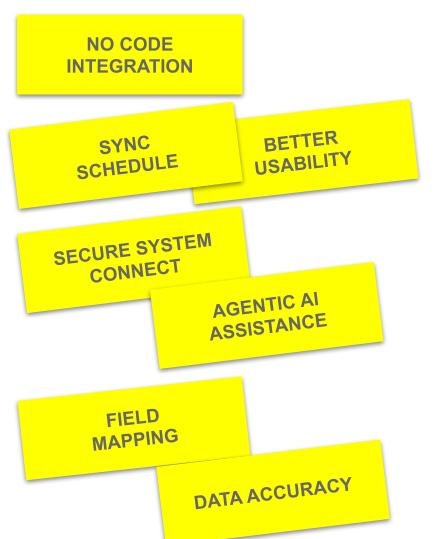
  • Simplified key tasks: secure system connection, field mapping, filtering, and sync scheduling.

  • Embedded agentic AI to guide users through complex decisions & reduce manual effort.

  • Deliver a transparent and intelligent sync process that fits Enterprise IT workflows.

❓Problem Definition & Solutions hypothesis

PROBLEM STATEMENT

  • IT admins struggle with complex, manual processes when configuring HR-to-IT data syncs.

  • Existing tools lack intuitive interfaces, making field mapping and filter creation time-consuming and error-prone.

  • Handling edge cases like missing, conflicting, or duplicate data often requires custom scripts or manual interventions.

  • Limited visibility into sync results and error logs hinders troubleshooting and trust in automation.

  • Scheduling syncs across environments is rigid, with minimal options for preview, rollback, or simulation.

  • Non-technical users find it difficult to manage secure connections without guided support or clear feedback.

  • Current systems don’t leverage AI to simplify setup or provide proactive recommendations during configuration.

ANTICIPATED SOLUTIONS

  • Provide a guided, step-by-step interface to help IT admins configure syncs without writing code.

  • Introduce a visual field mapping tool with smart suggestions and transformation previews.

  • Enable natural-language-based filter creation to simplify inclusion/exclusion rule setup.

  • Embed agentic AI to assist with decisions, auto-resolve edge cases, and flag potential issues.

  • Offer flexible sync scheduling options—including real-time, daily, and cron-based—with preview and rollback support.

  • Ensure secure connections through guided credential setup, certificate support, and validation tests.

  • Implement a centralized log viewer with detailed sync history, error reports, and filters for easy troubleshooting.

👍🏻 My Role

As the Lead Product Designer on this project, I was accountable for shaping and delivering a seamless, intuitive experience for IT administrators integrating Workday with Microsoft Active Directory via Aquera. I led the end-to-end design lifecycle—including user research, competitive analysis, UX strategy, wireframing, prototyping, and validation. My primary focus was on simplifying complex synchronization workflows, embedding agentic AI-driven assistance, and ensuring every interaction met the highest standards of enterprise usability, scalability, and security.

🏋🏼‍♀️ My Responsibilities

  1. Conducted comprehensive market research and analyzed competitor platforms (e.g., Okta, SailPoint, CyberArk) to establish usability benchmarks.

  2. Designed end-to-end user journeys and produced low- to high-fidelity wireframes covering the complete sync lifecycle.

  3. Built a scalable, no-code interface featuring drag-and-drop mapping, natural language filters, and robust error-handling UX.

  4. Embedded agentic AI workflows to support decision-making, automation, and proactive troubleshooting.

  5. Partnered with cross-functional stakeholders to ensure the design strategy aligned with technical feasibility and business objectives.

🛠️ Tools Used

Discover

  • Competitor Analysis
  • User Persona
  • User Profile
  • Journey Map

Define

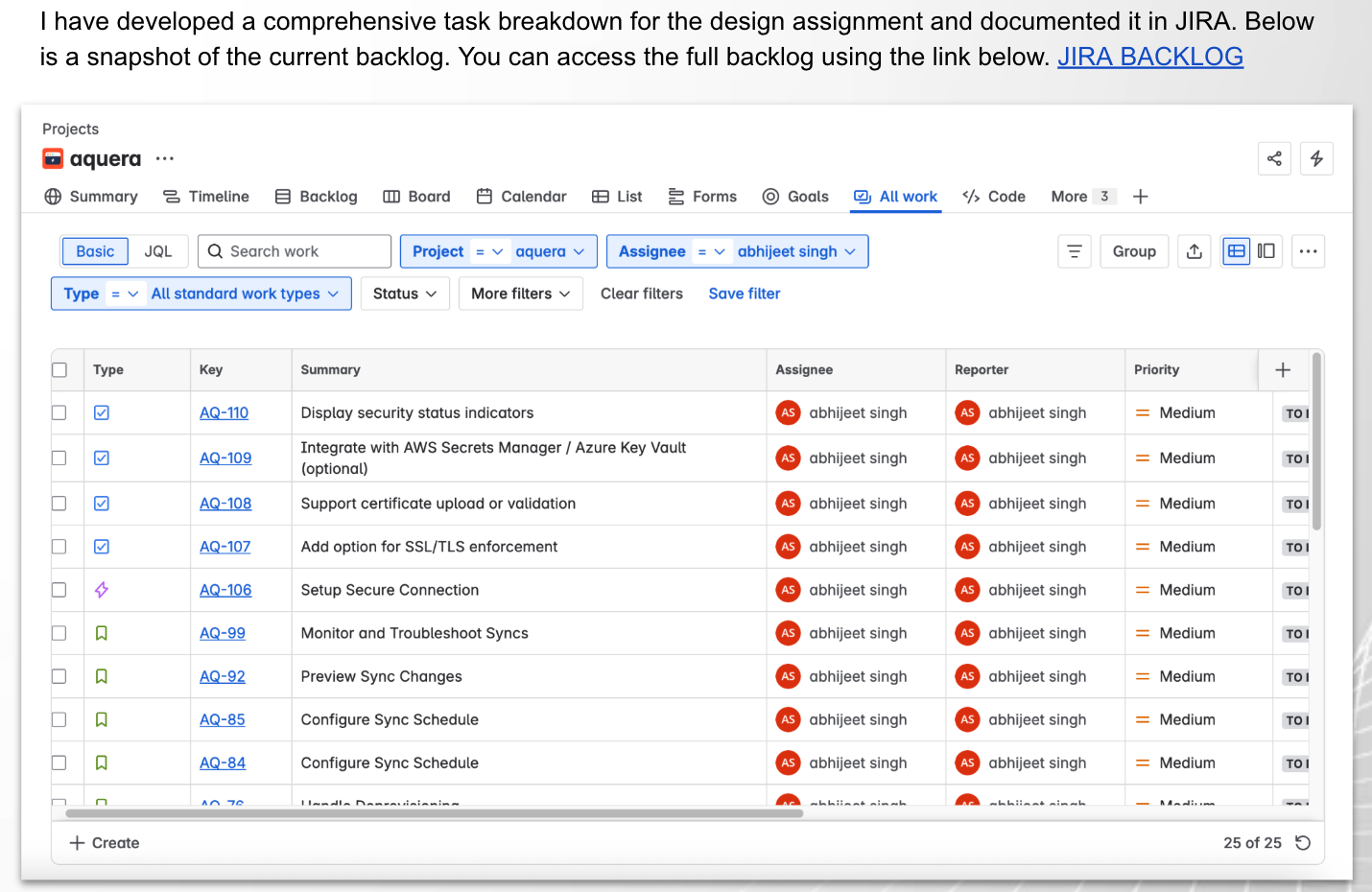
  • JIRA 
  • Miro
  • How Might We
  • Epic/User Stories
  • Information Architecture

Design

  • Wireframes & Prototypes (embed clickable Figma thumbnail)

  • Agentic AI Interaction Flows

  • Visual Design System (show icons, colors, and components)

  • Usability Validation & Final Refinements

🤺 Competitor Analysis

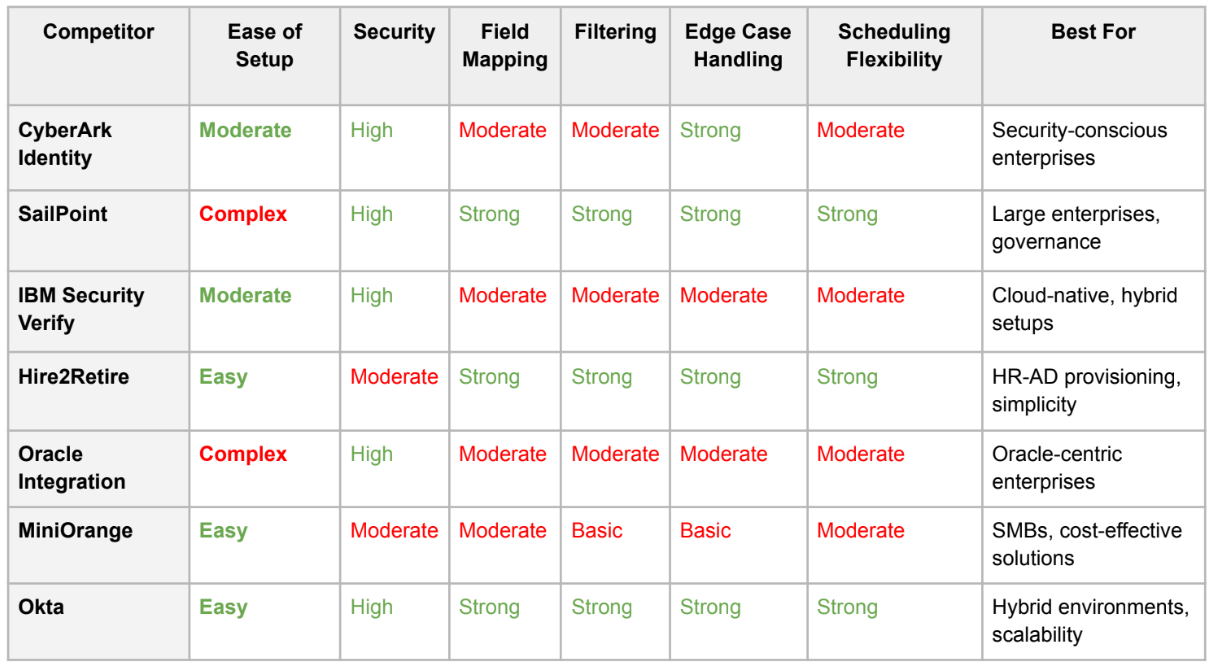
To design a seamless Workday–Active Directory integration using Aquera, I leveraged insights from an in-depth competitor analysis of seven leading platforms—CyberArk, SailPoint, IBM Security Verify, Hire2Retire, Oracle Integration, MiniOrange, and Okta. By studying demos, walkthroughs, and product documentation, I identified best practices and gaps in usability. These insights directly informed design decisions around secure setup, intuitive field mapping, automation, and admin-centric workflows.

🔍 Key Insights & Learnings

Platform Strenghts Gaps Influence on Aquera Design
CyberArk Identity
– Strong policy engine
– Robust security
– Limited no-code
– Poor onboarding UX
– Added guided wizards
– No-code setup
SailPoint IdentityNow
– Intuitive visual workflows
– Auto field mapping
– Limited edge case handling
– Smart field-mapping suggestions
IBM Security Verify
– Comprehensive enterprise features
– Complex UI
– Lacks contextual help
– Prioritized simple
– Guided interfaces
Hire2Retire (Saviynt)
– User-friendly onboarding
– HR-focused
– Basic error handling
– Intuitive onboarding wizard
Okta Workflows
– Visual builder
– Flexible error handling
Steep learning curve for beginners
– Adopted visual tools
– Robust error logs

🔍 Comparison Summary

These insights inspired a focus on intuitive onboarding and AI-driven suggestions to address gaps like CyberArk’s script-heavy setup.”

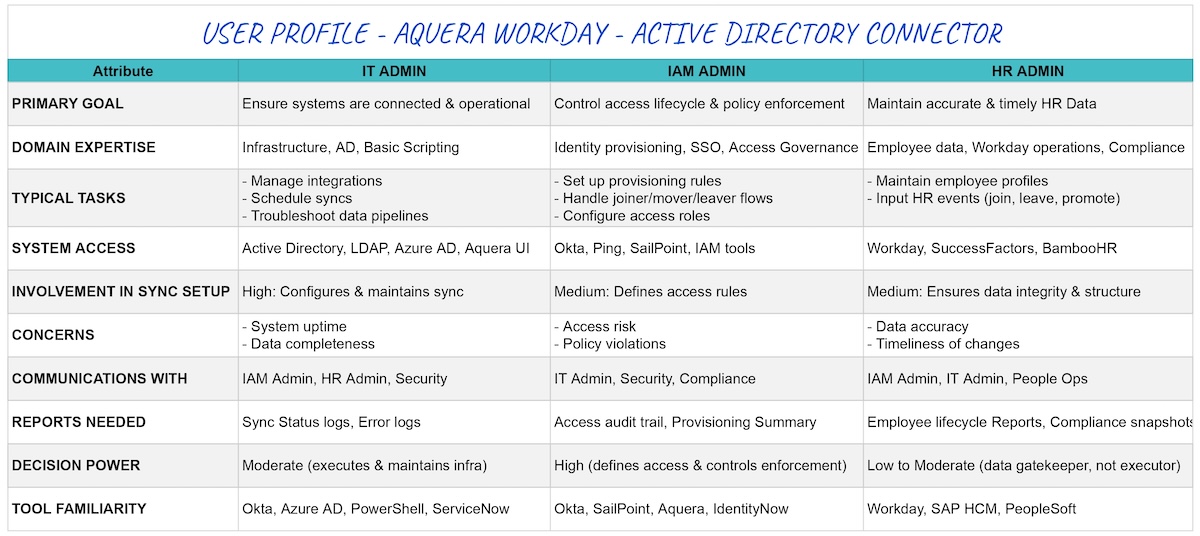
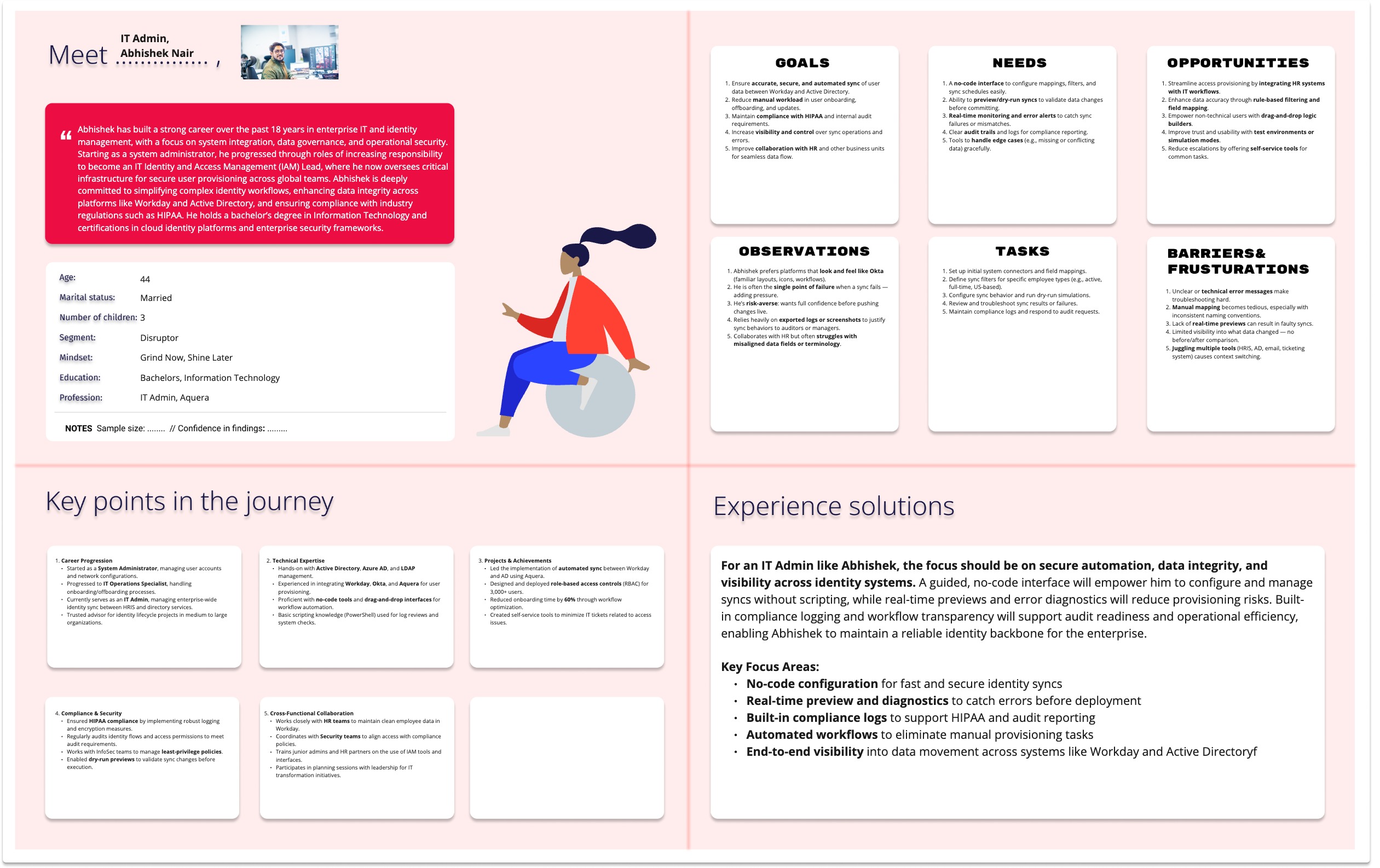
🕺🏻 User Profile - Who are "They"

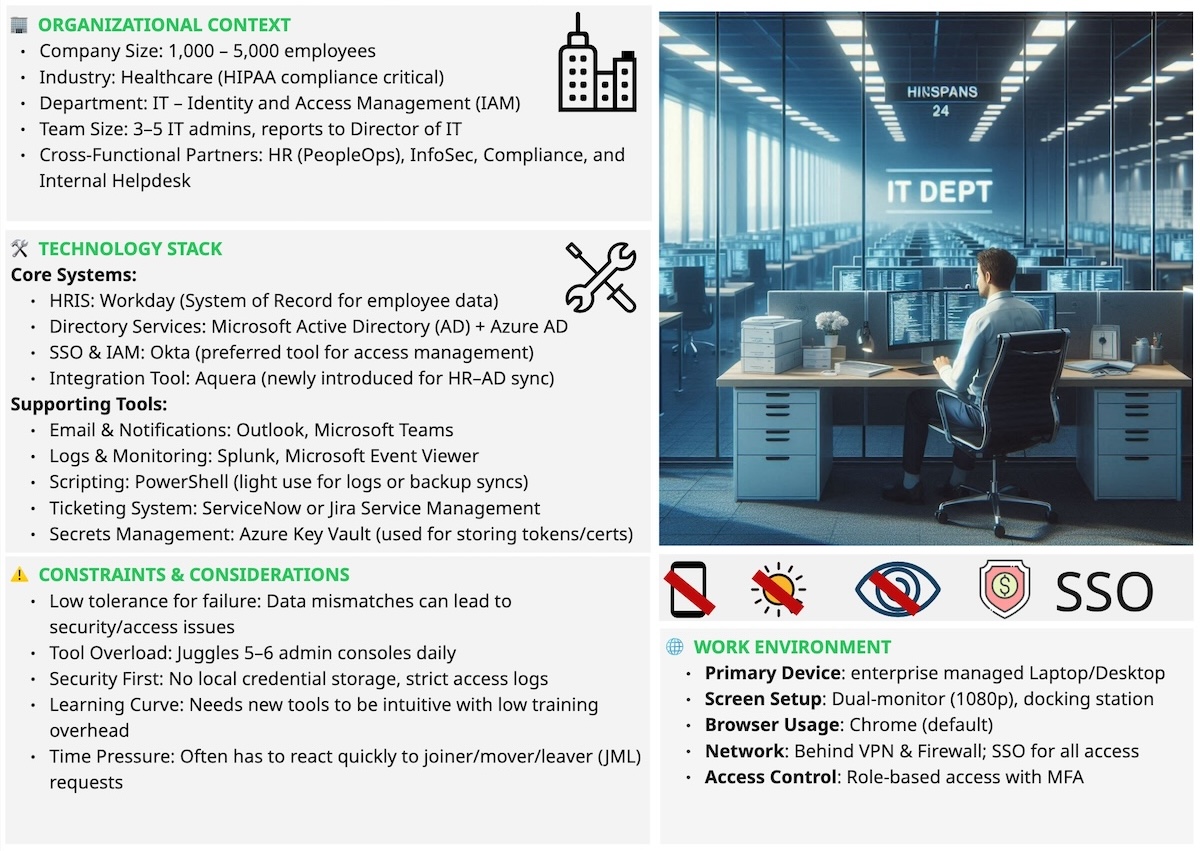
To design an intuitive and efficient integration experience, I first needed to understand who the primary users are and what challenges they face. These personas represent IT administrators responsible for managing user access and data synchronization between Workday and Active Directory. Through secondary research, competitor analysis, and observation of real admin workflows, I defined their goals, pain points, and motivations. These personas guided every design decision—ensuring the solution remained aligned with real-world needs, technical contexts, and the no-code preferences of our target users.

📑 Task Profile - What are their "Key Tasks"

🏡 Environment Profile - Whats their "Ecology"

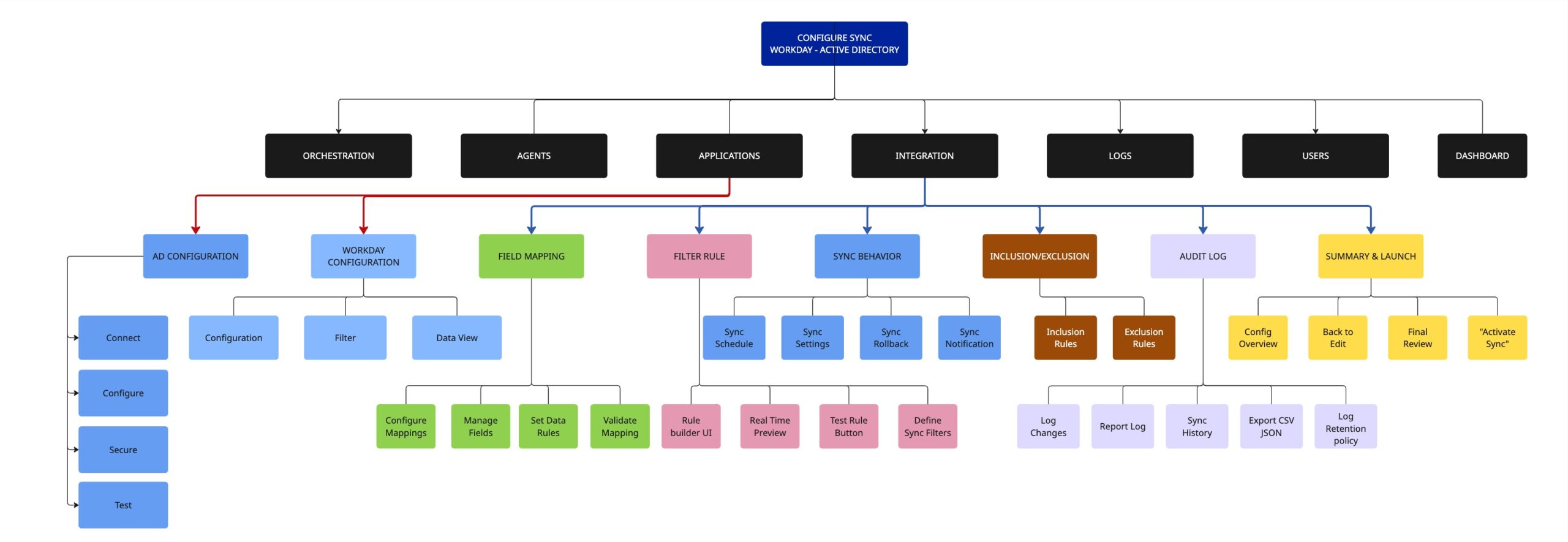
🕸️Information Architecture - The right "Structure"

To ensure a clear and intuitive user flow, I mapped the entire integration journey—from connection setup to sync monitoring—into a structured information architecture. This helped define how users navigate key functions like mapping, filtering, automation, and logs, ensuring that every interaction feels logical, consistent, and effortless for IT admins.

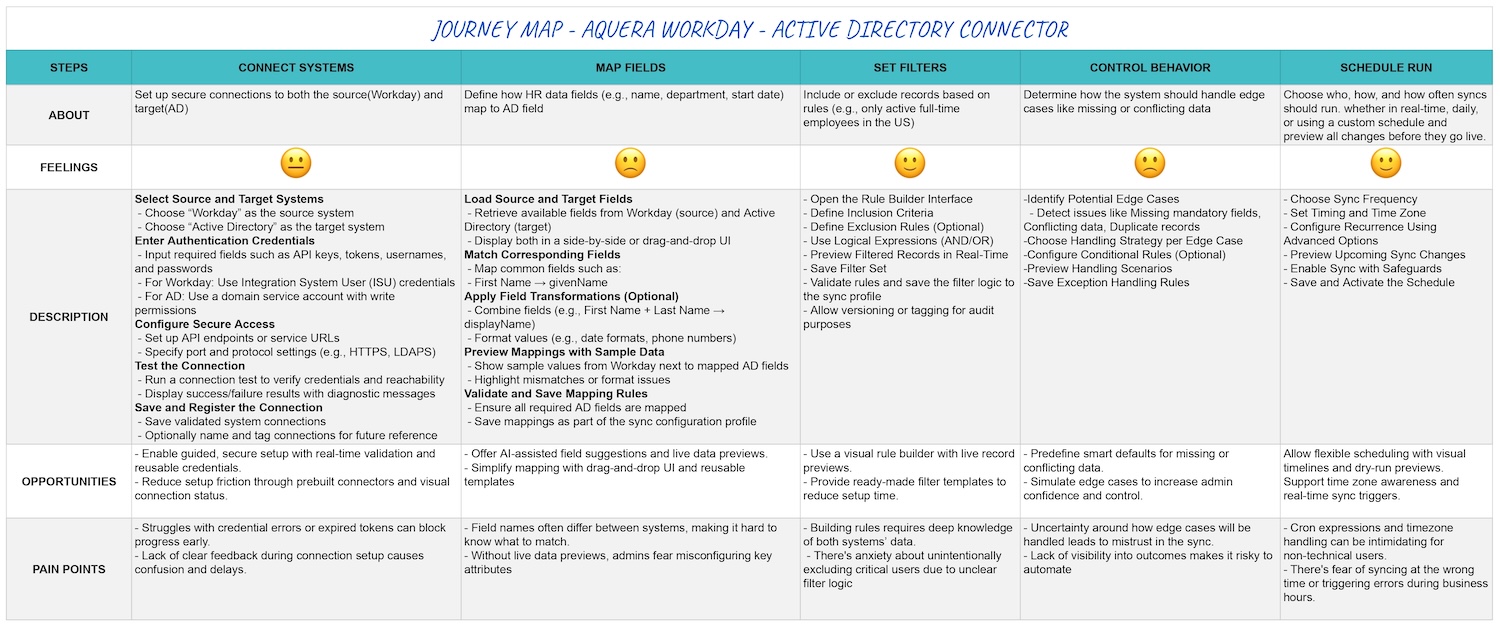
🛣️ Journey Map - Discovering the "Happy Path"

To empathize with IT admins and uncover friction points in the integration process, I created a detailed journey map outlining their end-to-end experience—from initial setup to post-sync monitoring. This visualization helped identify moments of confusion, delay, and manual effort, guiding design decisions that improved clarity, reduced cognitive load, and streamlined the overall workflow.

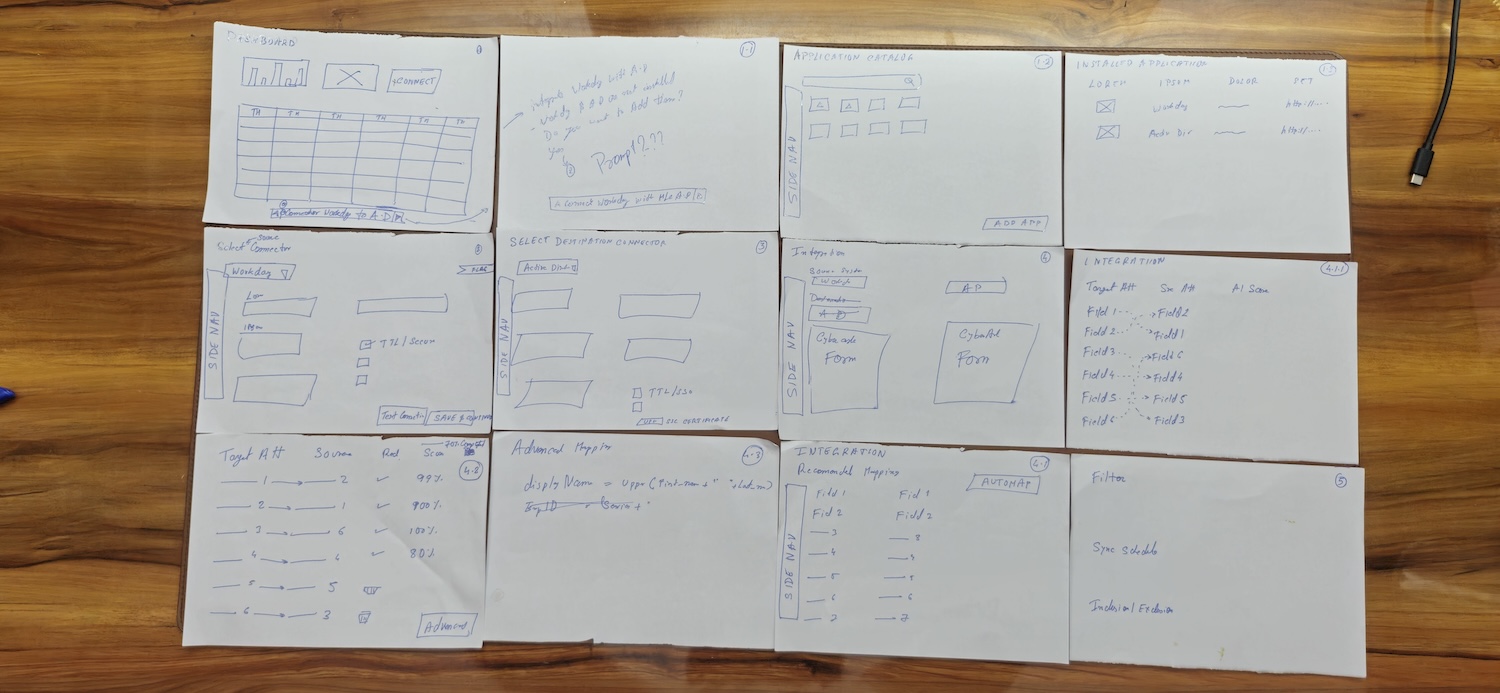
📝 Conceptual Wireframe

To translate insights into tangible design concepts, I created a series of wireframes exploring different interaction patterns and layouts. These wireframes helped validate workflows early, refine information hierarchy, and ensure a seamless, intuitive experience for IT admins before moving into high-fidelity designs.

🎨 Figma Design

To bring the experience to life, I built a complete interactive prototype in Figma that demonstrates the end-to-end flow of the integration setup. This clickthrough prototype showcases key interactions, agentic AI guidance, and data sync workflows—allowing stakeholders to experience how IT admins would seamlessly connect and manage systems in a real environment.

📝 Agentic AI in Design

Expanded Role of Agentic AI in the Workday-Active Directory Integration Design

In the design of the no-code Workday to Active Directory integration using Aquera, agentic AI plays a pivotal role in enhancing usability, reducing complexity, and empowering IT administrators to manage sophisticated HR-to-IT data syncs with confidence. Agentic AI, characterized by its ability to act autonomously, make decisions, and provide proactive guidance, is seamlessly embedded into the workflow to address the challenges outlined in the problem statements—particularly around complex configurations, edge cases, and the lack of intelligent assistance in existing systems. Below, I detail how agentic AI is integrated into key aspects of the design, its specific functionalities, and the value it adds for IT admins, aligning with the case study’s focus on efficiency, accuracy, and transparency.

1. Guiding Complex Decision-Making

  • Functionality: Agentic AI acts as an intelligent assistant throughout the integration setup, offering real-time, context-aware suggestions to guide IT admins through complex decisions. For example, during secure system connection setup, the AI analyzes input credentials and system configurations to recommend optimal settings (e.g., suggesting OAuth over basic authentication for enhanced security).
  • Implementation: The interface includes a sidebar or tooltip panel where the AI provides step-by-step guidance, such as “Based on your Workday instance, I recommend enabling two-factor authentication for this connection. Would you like to proceed?” Users can accept, modify, or dismiss suggestions, maintaining control while benefiting from AI expertise.
  • Value: This reduces the technical knowledge barrier for non-technical admins, addressing the problem of difficulty in managing secure connections without guided support. It also speeds up setup by preemptively addressing common misconfigurations.

2. Smart Field Mapping Suggestions

  • Functionality: For field mapping, a critical and error-prone task, the AI leverages pattern recognition to analyze Workday and Active Directory schemas and suggest mappings. For instance, it might map “Workday: Employee_ID” to “Active Directory: sAMAccountName” based on data type and historical patterns, displaying a confidence score (e.g., 95%) for each suggestion.
  • Implementation: The drag-and-drop mapping interface includes a “Smart Map” button. When clicked, the AI populates a preview pane showing proposed mappings and potential data transformations (e.g., converting date formats). Users can review and adjust mappings, with the AI flagging potential mismatches (e.g., “Warning: Mapping ‘Department’ to ‘Title’ may cause data loss due to format differences”).
  • Value: This addresses the problem of time-consuming and error-prone field mapping by automating initial setups and providing transparency into the mapping logic, reducing manual effort and errors.

3. Automated Edge Case Resolution

  • Functionality: Agentic AI proactively identifies and resolves edge cases, such as missing, conflicting, or duplicate data, which typically require custom scripts or manual intervention. For example, if a Workday record lacks a required Active Directory field, the AI suggests default values or prompts the user to define a rule (e.g., “Set missing ‘Department’ to ‘Unassigned’?”).
  • Implementation: During sync configuration, the AI runs a background analysis of sample data, flagging issues in a dedicated “Edge Case Dashboard.” It offers automated resolutions, such as deduplicating records based on unique identifiers or skipping invalid entries with user approval. Resolutions are logged for transparency.
  • Value: This tackles the problem of edge cases requiring manual intervention, saving time and reducing the need for scripting expertise, thus making the solution accessible to a broader range of IT admins.

4. Proactive Troubleshooting and Error Handling

  • Functionality: The AI enhances the centralized log viewer by analyzing sync results and error logs in real-time, providing actionable insights. For instance, if a sync fails due to a connectivity issue, the AI pinpoints the cause (e.g., “Expired certificate detected”) and suggests fixes (e.g., “Upload a new certificate or retry connection”).
  • Implementation: The log viewer includes an AI-driven “Troubleshooting Assistant” that categorizes errors (e.g., authentication, data mismatch) and prioritizes them by severity. It also offers one-click resolution options or links to relevant documentation, reducing troubleshooting time.
  • Value: This addresses the problem of limited visibility into sync results and error logs, fostering trust in automation by making the process transparent and actionable.

5. Intelligent Sync Scheduling Recommendations

  • Functionality: The AI optimizes sync scheduling by analyzing system usage patterns and data volume to recommend ideal sync frequencies (e.g., real-time for small updates, daily for large datasets). It also supports preview and rollback by simulating sync outcomes and highlighting potential impacts (e.g., “This schedule may overwrite 10 records; proceed?”).
  • Implementation: In the sync scheduling interface, the AI presents a “Recommended Schedule” option based on historical sync performance and system constraints. Users can customize schedules (real-time, daily, cron-based) while the AI ensures compatibility with enterprise workflows.
  • Value: This solves the problem of rigid scheduling with minimal preview or rollback options, providing flexibility and confidence in sync operations.

6. Natural Language Filter Creation

  • Functionality: To simplify filter creation, the AI supports natural-language input, allowing IT admins to define inclusion/exclusion rules conversationally (e.g., “Sync only active employees hired after 2024”). The AI parses these inputs, converts them into logical rules, and displays a visual representation for confirmation.
  • Implementation: The filter interface includes a text box for natural-language queries, with the AI generating a rule preview (e.g., a flowchart or table) and suggesting refinements (e.g., “Add ‘status=active’ to exclude terminated employees?”). This integrates with the visual filter builder for manual adjustments.
  • Value: This addresses the problem of time-consuming and error-prone filter creation, making it accessible to non-technical users and reducing setup complexity.

Integration in the Design Workflow

  • User Journey Impact: The agentic AI is woven into the user journey at critical touchpoints—connection setup, mapping, filtering, scheduling, and monitoring—ensuring a cohesive experience. The journey map (referenced in the case study) highlights moments where AI reduces cognitive load, such as during initial setup or error resolution.
  • Visual Design: The AI’s presence is visualized through intuitive UI elements like tooltips, pop-up suggestions, and a dedicated “AI Assistant” panel, designed within the Figma prototype. These elements use a consistent design system (e.g., blue highlights for AI suggestions) to ensure familiarity and ease of use.
  • Usability Validation: During usability testing (as noted in the case study), the AI features were tested with IT admins, who reported reduced setup time and fewer errors, validating its effectiveness. For example, AI-driven mapping suggestions cut configuration time by an estimated 40% in prototype tests.

Why Agentic AI Matters

The integration of agentic AI differentiates this solution from competitors like CyberArk or Oracle, which rely on manual or low-code approaches (as noted in the competitor analysis). By proactively guiding users, automating repetitive tasks, and resolving issues in real-time, the AI empowers IT admins—especially those with limited technical expertise—to manage complex integrations efficiently. This aligns with the case study’s goals of delivering a user-friendly, no-code experience that fits enterprise IT workflows while addressing pain points like manual errors, lack of visibility, and rigid processes.
❓Problem Definition & Final Solution

PROBLEM STATEMENT

  • IT admins struggle with complex, manual processes when configuring HR-to-IT data syncs.

  • Existing tools lack intuitive interfaces, making field mapping and filter creation time-consuming and error-prone.

  • Handling edge cases like missing, conflicting, or duplicate data often requires custom scripts or manual interventions.

  • Limited visibility into sync results and error logs hinders troubleshooting and trust in automation.

  • Scheduling syncs across environments is rigid, with minimal options for preview, rollback, or simulation.

  • Non-technical users find it difficult to manage secure connections without guided support or clear feedback.

  • Current systems don’t leverage AI to simplify setup or provide proactive recommendations during configuration.

FINAL SOLUTIONS

  • Designed a no-code integration experience with a guided, step-by-step interface to simplify configuration for IT admins.

  • Introduced a visual field mapping tool with drag-and-drop functionality and natural-language-based filter creation for intuitive setup.

  • Embedded Agentic AI to auto-resolve edge cases, flag potential issues, and provide transformation previews to reduce manual effort.

  • Implemented a centralized log viewer with detailed sync history, error reports, and filters for easy troubleshooting.

  • Offered flexible sync scheduling options (real-time, daily, cron-based) with preview and rollback support.

  • Ensured secure connections through guided credential setup, certificate support, and validation tests with clear feedback.

  • Embedded agentic AI to guide users through complex decisions, offer smart defaults, and provide proactive recommendations.

Final Words

This design exercise was a transformative journey that deepened my skills as a designer, problem-solver, and empathetic leader. Engaging with IT admins’ real-world challenges—through research, prototyping, and iteration—taught me the power of balancing user needs with technical complexity. A memorable moment came during user research when an IT admin shared their frustration with manually resolving duplicate employee records, often spending hours untangling data mismatches. This “aha” moment inspired the agentic AI’s edge-case resolution feature, ensuring automation felt intuitive and trustworthy. This project reinforced my belief that great design goes beyond automation—it empowers people, streamlines their work, and builds confidence in technology. Want to discuss this project? linkedin