Improving User Interfaces of Generative AI (GenAI) Applications
Introduction:
Generative AI (GenAI) has revolutionized how users interact with technology. By enabling the creation of text, images, and other creative outputs with minimal input, GenAI has opened a new frontier in the design world. Most GenAI applications, such as content creation tools, design platforms, and code generators, rely heavily on structured, form-like interfaces where users provide prompts by filling out fields, selecting options, or inputting multiple parameters to tailor the results. While these interfaces are functional and effective, they often feel tedious, time-consuming, or unintuitive, particularly for non-expert users. This leads to challenges such as cognitive load and limited flexibility.
This case study examines the limitations of form-based GenAI interfaces, explores real-world examples, and analyzes the technologies influencing their evolution. The intent of this white paper is to propose strategies that make these experiences more intuitive, efficient, and user-friendly over time, ultimately enhancing usability and accessibility for a broader audience.
Current State of GenAI User Interfaces
Generative AI (GenAI) applications are rapidly transforming how users create content, generate images, and write code. However, most GenAI tools today rely on structured, form-based user interfaces that require users to provide detailed inputs to generate meaningful outputs.
While form-based interfaces currently dominate the GenAI landscape for their structure and flexibility, they also introduce friction—especially for new users. As the field matures, there’s a growing need to evolve these interfaces toward more intuitive, conversational, and adaptive models that lower the barrier to entry and enhance user experience.
1. Form-Based Interaction
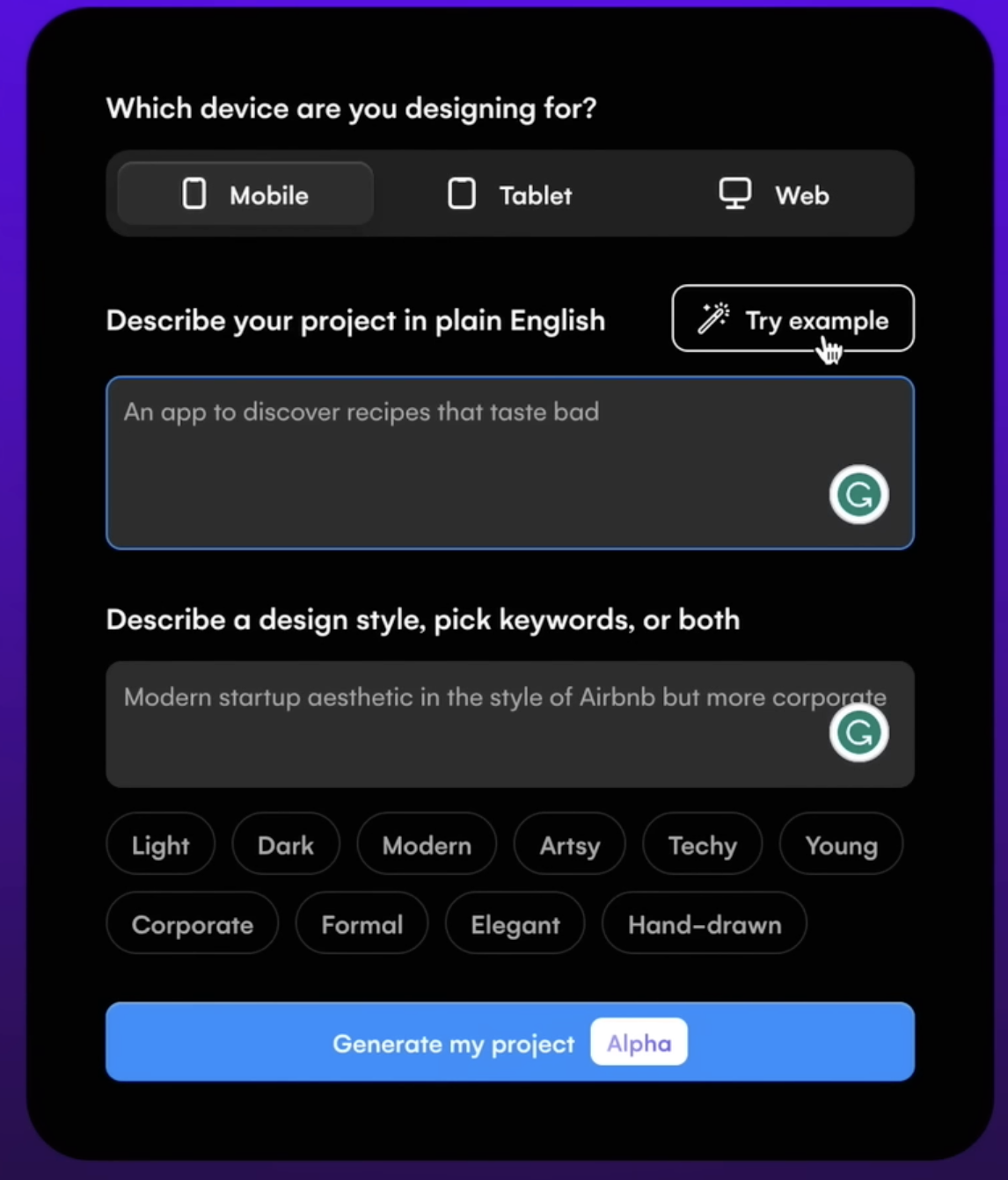
At the heart of most Generative AI (GenAI) applications lies a form-based interaction model, designed to provide a structured framework for users to articulate their requirements and generate personalized outputs. These forms, comprising input fields, dropdown menus, sliders, and other interactive elements, guide users through the process of specifying details such as tone, style, visual elements, or functionality.
By offering a clear and organized interface, form-based systems ensure that users, especially first-time or non-expert users, can navigate the complexity of GenAI tools with a degree of clarity. While these forms facilitate precise input collection, their reliance on extensive user-provided details can lead to inefficiencies, cognitive overload, and accessibility barriers. In this section, let’s elaborate on the design and functionality of form-based interactions, their benefits and limitations, and how they could evolve to enhance usability and streamline workflows in the future.
1.1 Components of Form-Based Interfaces
Form-based interactions in GenAI tools typically incorporate a combination of interactive elements, each serving a specific purpose in collecting user inputs. These components include:
Input Fields: These are text boxes where users manually enter textual descriptions, instructions, or data to define their request. Input fields are versatile, allowing users to provide open-ended prompts or specific details. Input fields capture the core intent of the user’s request, acting as the primary channel for conveying creative or functional requirements.
- Example of Content Generation: In Jasper AI, a user might enter a prompt like, “Write a 300-word blog post about writing accessible blogs for bots and humans.” The input field allows freeform text, giving users flexibility but requiring them to articulate their needs clearly.
- Example of Image Generation: In Stable Diffusion’s web interface, a user might type, “A serene beach at sunset, photorealistic style,” into a prompt field to describe the desired image.
Dropdown Menus: These menus provide predefined options for users to select attributes, ensuring consistency and reducing the need for users to invent terminology. Dropdowns are commonly used for categorical parameters. Dropdowns simplify decision-making by presenting a curated list of options, making it easier for users to specify parameters without needing to recall or invent terms.
- Example of Content Generation: In Copy.ai, a dropdown menu might offer tone options like “Professional,” “Casual,” “Humorous,” or “Empathetic,” allowing users to select the desired voice for their text.
- Example of Image Generation: DALL-E’s interface might include a dropdown for artistic styles, such as “Photorealistic,” “Anime,” “Impressionist,” or “Cyberpunk,” to specify the visual aesthetic.
Sliders or Adjusters: Sliders allow users to fine-tune continuous or scalable parameters, offering a visual and interactive way to adjust settings like intensity, length, or specificity. Sliders provide an intuitive way to tweak parameters without requiring precise numerical inputs, appealing to users who prefer visual or incremental adjustments.
- Example of Content Generation: Writesonic might include a slider to adjust the “Creativity Level” from “Factual” to “Highly Creative,” influencing how imaginative the text output is.
- Example of Image Generation: MidJourney’s web interface could feature a slider for “Detail Level,” ranging from “Low Detail” to “Hyper-Detailed,” to control the intricacy of the generated image.
Checkboxes or Toggles: These elements allow users to enable or disable specific features or options, often used for secondary or optional parameters. Checkboxes and toggles streamline the inclusion of optional features, reducing clutter in the primary form.
- Example of Content Generation: A checkbox in Jasper AI might let users select “Include SEO Keywords” or “Add Call-to-Action” to customize the output.
- Example of Image Generation: Stable Diffusion might offer a toggle for “Include Text Overlay” to add captions to the image.
Predefined Templates or Presets: Some interfaces offer templates or presets to pre-fill forms with common settings, catering to specific use cases. Templates reduce the effort needed to configure forms, especially for repetitive or standardized tasks.
- Example of Content Generation: Copy.ai might provide a “Social Media Post” template that sets tone to “Engaging,” length to “Short,” and purpose to “Marketing.”
- Example of Image Generation: DALL-E could offer a “Product Mockup” preset with a clean background, centered composition, and photorealistic style.
Form-based interfaces dominate GenAI tools like Jasper AI, and MidJourney. Whether it’s selecting tone and format for content, typing prompt commands for visual generation, or writing code comments to guide completions, these structured inputs serve as the AI’s instructions. This structure has its merits: a guided experience that helps users by narrowing choices, customizability that enables fine-tuning of the output, and predictability that ensures AI receives consistent parameters. But beneath the surface, these benefits often come at the cost of user friction—especially for those unfamiliar with prompt engineering or technical configurations.
1.2 Challenges with Form-Based Interfaces
Cognitive Load: Filling multiple fields like tone, style, audience, length, and format can quickly overwhelm users. Especially for those new to GenAI, it’s not always clear what information is needed or how to phrase it. This results in trial-and-error interactions that feel tedious and discouraging.
Accessibility Barriers: Not every user is a prompt engineer. Complex jargon, syntax requirements, or unclear input expectations create a steep learning curve. Non-technical and first-time users often struggle to get quality results simply because they don’t know how to “talk” to the AI.
Inefficiency in Iterative Workflows: Refining AI outputs often requires revisiting and adjusting inputs repeatedly. Each iteration may demand re-filling the form or tweaking prompts slightly, which becomes time-consuming and breaks the creative flow.
Limited Context Awareness: Form fields are inherently static. They don’t “remember” previous inputs or user preferences across sessions. This leads to redundant inputs and a lack of personalization. The result? Users must repeatedly explain their needs without the system building a contextual understanding.
Difficulty in Articulating Needs: Many users know what they want once they see it—but not always how to describe it. Without previews, visual cues, or examples, users may struggle to articulate their intent, leading to suboptimal outputs that require further refinement.
Static and Mechanical Experience: Forms offer structure, but often at the expense of fluid interaction. They can feel mechanical and unresponsive—especially in contrast to conversational AI, which feels more natural and adaptive. This static nature can discourage exploration and creativity.
2. Extensive Input Requirements
Generative AI (GenAI) applications are designed to deliver highly personalized outputs tailored to users’ specific needs, whether for content creation, image generation, code development, or other creative tasks. In order to achieve this, current interfaces often require users to provide a significant amount of detail through form-based or prompt-driven systems.
For example, users must define parameters like tone, style, purpose, or visual elements, which act as instructions for the AI to interpret and execute. While this granularity enables precise and relevant results, it frequently overwhelms users, particularly novices, non-technical individuals, or those dealing with multiple parameters. The complexity of these input requirements can lead to cognitive overload, inefficiency, and frustration, undermining the accessibility and usability of GenAI tools.
In this section, I will elaborate on the nature of these extensive input requirements, their implications across different use cases, and how interfaces could evolve to balance personalization with simplicity. The need for extensive inputs stems from the AI’s reliance on explicit user guidance to align OUTPUT WITH INTENT. Below, I explore content generation and image generation as key design domains. The aim is to highlight the specific parameters users must provide and why they contribute to complexity.
2.1 Content Generation
In tools like Jasper AI, Copy.ai, or Writesonic, users seeking written content (e.g., blog posts, emails, or social media captions) are often presented with multi-field forms or detailed prompt templates requiring inputs such as
Tone: The tone parameter allows users to define the emotional or stylistic voice of the generated content, with options such as professional, casual, humorous, empathetic, or authoritative. For instance, a user might select “professional” to craft a polished corporate report that conveys credibility or “casual” for a relatable lifestyle blog that resonates with a general audience. This choice significantly influences the output’s language and phrasing, requiring users to understand subtle distinctions between tones to align with their goals.
However, novices may struggle to differentiate between similar options like “empathetic” and “inspirational,” leading to potential misalignment in the output. Clear interface guidance or examples could help users make informed selections.
Style: Style refers to the structural or rhetorical approach of the content, with choices like persuasion (e.g., for compelling sales copy), narration (e.g., for immersive storytelling), description (e.g., for vivid product listings), or analytical (e.g., for data-driven whitepapers). For example, a user might choose “persuasion” to create an advertisement that drives conversions or “narrative” for a brand story that engages readers emotionally. This parameter shapes the content’s organization and focus, but its abstract nature can confuse users unfamiliar with writing terminology. Interfaces often present these options in dropdowns, which streamline selection but may limit flexibility for users seeking a blend of styles, such as persuasive yet descriptive.
Purpose: The purpose parameter categorizes the content’s intended goal, such as marketing (to drive sales or brand awareness), informational (to educate or inform), entertainment (to engage or amuse), or inspirational (to motivate or uplift). For instance, a user might select “marketing” for a promotional email to boost product sales or “informational” for a tutorial explaining a technical process.
This choice helps the AI tailor the content’s structure and messaging to the desired outcome, but users must clearly understand their objective to select appropriately. Ambiguity in purpose can lead to outputs that miss the mark, requiring iterative refinements, especially for multifaceted goals like combining education with inspiration.
Audience: Audience specifications define the target demographic or interest group, such as age ranges, professions, or hobbies (e.g., “tech-savvy millennials” or “small business owners”). For example, a user might target “parents of young children” for a toy advertisement or “software developers” for a technical blog. This parameter ensures the content resonates with the intended readers by adjusting vocabulary, examples, and cultural references.
However, users must accurately identify their audience’s characteristics, which can be challenging without market research or clear interface prompts. Overly broad or vague selections, like “general public,” may result in generic outputs that lack impact.
Keywords: Keywords are specific terms or phrases included for search engine optimization (SEO) or thematic focus, such as “sustainability,” “cloud computing,” or “healthy living.” For instance, a user might input “organic skincare” to optimize a blog for relevant searches or to emphasize a product’s eco-friendly attributes. This parameter helps align the content with marketing goals or topical relevance, but users must choose keywords strategically to avoid awkward integration or over-optimization. Novices may struggle to identify effective keywords without guidance, and interfaces often lack real-time suggestions to optimize this input, increasing the risk of suboptimal results.
Length: The length parameter specifies the content’s size, measured in word count, paragraph count, or estimated reading time (e.g., “300 words,” “three paragraphs,” or “2-minute read”). For example, a user might request “500 words” for a detailed article or “100 words” for a concise social media post. This choice ensures the output fits the intended platform or purpose, but users must estimate appropriate lengths, which can be difficult without experience. Interfaces may offer sliders or predefined options (e.g., “Short,” “Medium,” “Long”), but vague specifications can lead to outputs that are too brief or overly verbose, necessitating revisions.
Additional Parameters: Additional parameters encompass formatting preferences (e.g., bullet points vs. prose), language style (e.g., formal vs. conversational English), or specific elements like calls-to-action (e.g., “include a ‘buy now’ button”). For instance, a user might request “bullet points” for a product description to enhance readability or “formal English” for a legal document. These options provide granular control over the output’s presentation and functionality, but they increase the complexity of the input process, especially when combined with other fields. Users may overlook these parameters or struggle to prioritize them, and interfaces rarely guide users on their impact, leading to potential oversights.
Example:
A small business owner using Jasper AI to create a promotional email might input: “Write a 200-word email, professional tone, persuasive style, targeting busy parents, for a back-to-school sale, with keywords ‘discount’ and ‘school supplies,’ and a call-to-action to shop online.”
This prompt requires the user to make multiple decisions about abstract concepts (e.g., distinguishing “professional” from “formal” or “persuasive” from “engaging”), which can be daunting, especially for those without marketing expertise. The form may include dropdown menus, text fields, or sliders, each adding to the cognitive load. If the user omits a parameter (e.g., forgetting to specify length), the output may be misaligned, necessitating revisions.
Challenges:
- Abstract Decision-Making: Users must understand nuanced terms like “tone” or “style,” which may lack clear definitions in the interface. For instance, is “casual” more relaxed than “conversational”?
- Time-Intensive: Completing a form with 5–10 fields takes time, especially for iterative tasks where users refine outputs repeatedly.
- Error-Prone: Misjudging a parameter (e.g., selecting “humorous” for a sensitive topic) can lead to inappropriate results, frustrating users.
- Inaccessibility: Non-native speakers or novices may struggle with jargon or the sheer volume of choices, limiting adoption.
2.2 Image Generation
In image generation tools like MidJourney or DALL-E, users must provide detailed prompts or form inputs to define the visual output. Common parameters include:
Visual Elements: Visual elements define the core subjects, objects, characters, settings, or actions in the generated image, such as “a dragon flying over a snowy mountain” or “a futuristic robot in black hole.” This parameter forms the foundation of the image’s narrative or theme, requiring users to describe their vision clearly and specifically to avoid ambiguous outputs.
For example, a user might specify “jedi in intergalactic battle” to create a dynamic scene, but vague inputs like “a fantasy scene” can lead to unpredictable results. Users often input these details via text prompts or form fields, which demand a balance of creativity and precision. Novices may struggle to articulate complex scenes, highlighting the need for interface guidance or example prompts.
Color Palette: The color palette parameter specifies the hues, contrasts, or overall mood of the image, such as “vibrant hue and saturation” for a bold aesthetic or “muted pastels” for a soft, calming effect. This choice significantly influences the image’s emotional impact and visual coherence, allowing users to align the output with their intended tone, like “monochromatic grays” for a dystopian scene. Users must anticipate how colors interact with other elements, which can be challenging without design expertise.
Interfaces may offer dropdowns or color pickers, but without real-time previews, users often resort to trial and error to achieve the desired effect. Clear examples or color palette suggestions could enhance usability for non-designers.
Composition: Composition refers to the layout, perspective, or focal point of the image, such as “close-up portrait” for an intimate character study or “wide-angle landscape” for a sweeping vista. This parameter determines how elements are arranged within the frame, guiding the viewer’s attention and shaping the image’s narrative impact. For instance, a user might choose “centered composition” to emphasize a single subject or “rule of thirds” for a balanced scene. However, technical terms like “perspective” or “focal point” can intimidate novices, and poorly defined compositions may result in cluttered or unbalanced images. Interfaces could improve by offering visual templates or thumbnails to illustrate composition options.
Artistic Style: Artistic style defines the aesthetic influence of the image, with options like PHOTOREALISM (for lifelike visuals), IMPRESSIONISM (for painterly effects), CYBERPUNK (for futuristic themes), ANIME (for stylized characters), or SURREALISM (for dreamlike abstractions). For example, a user might select “anime” for a vibrant character portrait or “photorealism” for a realistic product mockup. This parameter shapes the image’s visual language, but users must understand the nuances of each style to choose appropriately, which can be daunting for those unfamiliar with art terminology.
Dropdown menus or style galleries in interfaces help, but blending styles (e.g., “cyberpunk with impressionist touches”) often requires advanced prompt crafting.
Lighting and Mood: Lighting and mood parameters specify the illumination and emotional atmosphere, such as “golden hour glow” for warm, nostalgic tones, “noir shadows” for dramatic contrast, or “dreamy haze” for ethereal softness. These choices enhance the image’s ambiance, making it feel vibrant, mysterious, or serene, as in “moonlit forest” for a mystical effect. Users must visualize how lighting interacts with other elements, which requires some design intuition, and vague inputs can lead to inconsistent results. Interfaces rarely provide real-time lighting previews, forcing users to iterate multiple times. Offering mood boards or lighting presets could simplify this process for casual users.
Technical Specifications: Technical specifications include parameters like ASPECT RATIO (e.g., 16:9 for widescreen), RESOLUTION (e.g., 4K for high-quality prints), or level of detail (e.g., “hyper-detailed” for intricate textures). For instance, a user might choose “1:1” for a social media post or “8K” for a professional artwork. These settings ensure the image meets practical requirements, but terms like “aspect ratio” or “resolution” can confuse non-technical users, leading to incorrect selections. Interfaces often use dropdowns or sliders for these inputs, but without clear explanations, users may overlook their importance, resulting in outputs unsuitable for their intended use. Tooltips or visual guides could improve accessibility.
Modifiers: Modifiers are additional tweaks that refine the image’s aesthetic or context, such as “TRENDING ON ARTSTATION” for a polished, professional look, “CINEMATIC” for a film-like quality, or “MINIMALIST” for clean, simple designs. For example, a user might add “VINTAGE” to evoke nostalgia or “HIGHLY STYLIZED” for bold artistic effects. These parameters offer creative flexibility but require users to understand their impact, which can be trial-and-error for beginners.
In prompt-based tools like MidJourney, modifiers are added to text (e.g., “–style cinematic”), while form-based interfaces may use checkboxes, adding complexity. Interfaces could benefit from suggesting modifiers based on the selected style or purpose.
Example Scenario:
A graphic designer using MidJourney might input: “A futuristic cityscape at night, neon colors, cyberpunk style, high detail, centered composition, 4K resolution, –ar 16:9, –v 6.”
This prompt requires familiarity with the tool’s syntax (e.g., “–ar” for aspect ratio) and an understanding of visual concepts like “composition” or “style.” The designer must juggle multiple parameters, and even minor errors—like omitting “high detail”—can produce suboptimal results. For tools with form-based interfaces (e.g., Stable Diffusion’s web UI), users might select options from dropdowns or sliders, but the sheer number of fields (e.g., style, color, lighting) can feel overwhelming.
2.3 Challenges:
- Technical Barriers: Terms like “aspect ratio” are unfamiliar to casual users, creating a learning curve.
- Trial and Error: Users often need multiple attempts to refine prompts, as small changes (e.g., “bright” vs. “vibrant”) yield vastly different outputs.
- Cognitive Overload: Visualizing how parameters interact (e.g., “cyberpunk” with “muted colors”) is difficult, leading to guesswork.
- Inconsistency: Without clear guidance, users may struggle to replicate successful outputs, as prompts are highly sensitive to wording.
Advantages of Current GenAI Interfaces
Systematic Guidance: The structured nature of these interfaces provides a logical and step-by-step framework for users. By breaking down inputs into discrete fields or options, the system ensures that users articulate their requirements clearly and systematically. This minimizes errors or misunderstandings.
Flexibility for Customization: These interfaces allow users to exert a high degree of control over the output. By adjusting parameters such as tone, style, or length, users can fine-tune results to align with specific goals or preferences. This flexibility makes GenAI interfaces versatile and applicable across a wide range of industries and use cases.
Current Technologies influence on GenAI UI Design?
Several cutting-edge technologies shape and enhance the design of GenAI user interfaces, making them more intuitive, adaptive, and engaging. Here are the most influential ones:
Natural Language Processing (NLP): Natural Language Processing (NLP) is the cornerstone of intuitive and user-centric Generative AI (GenAI) interfaces, enabling systems to understand, interpret, and respond to human language in ways that feel natural and personalized. NLP empowers GenAI interfaces to interpret and respond to human language with remarkable precision, enabling conversational and context-aware interactions. It drives features like sentiment analysis, tone adaptation, and multilingual support, making interfaces more intuitive and globally accessible.
Machine Learning (ML): ML algorithms analyze user behavior and preferences to predict and suggest inputs, streamlining the interaction process. By learning from minimal prompts, ML reduces the need for extensive manual configuration, enhancing efficiency.
Multimodal AI: Multimodal AI integrates diverse input types—text, images, voice, sketches, and more—into cohesive interactions. This allows users to communicate their intent through their preferred medium, reducing reliance on text-heavy forms.
Voice Recognition and Synthesis: Advanced voice technologies enable hands-free input and audio-based interactions, improving accessibility for users with disabilities or those seeking convenience. Synthesized responses further enhance the conversational feel of GenAI tools.
Real-Time Rendering Engines: These engines power interactive previews, allowing users to see and adjust outputs (e.g., images, videos, or designs) in real time. This dynamic feedback loop minimizes iterative refinements and enhances creative control.
Adaptive Design Systems: Adaptive UI frameworks ensure that GenAI interfaces are responsive and optimized across devices, from smartphones to desktops, providing a consistent and user-friendly experience.
Augmented and Virtual Reality (AR/VR): AR/VR technologies create immersive environments for crafting prompts and interacting with outputs, offering a 3D workspace for tasks like design, visualization, or prototyping.
Predictive Analytics: By analyzing historical user data, predictive analytics pre-fills forms, suggests templates, or recommends parameters, simplifying the input process and tailoring the experience to individual needs.
Elaborating on NLP
Natural Language Processing stands as a cornerstone of modern GenAI interfaces, enabling fluid, human-like interactions that reduce complexity and enhance personalization. Its key contributions includes:
Deep Understanding of User Inputs: NLP algorithms analyze the semantics, syntax, and context of user prompts, ensuring the AI accurately interprets instructions, even when they are vague or incomplete. For example, a prompt like “Write a fun post for my cafe” is understood to imply a casual tone and promotional intent.
Conversational Interfaces: NLP replaces static forms with dynamic, chatbot-like interactions. Instead of filling out fields, users can engage in a dialogue where the AI asks clarifying questions, such as, “Is this for social media or your website?” This makes the process feel natural and collaborative.
Multilingual Accessibility: With robust language translation and multilingual support, NLP enables users worldwide to interact in their native languages, breaking down barriers for non-English speakers and fostering global adoption.
Personalized Output Tailoring: Through sentiment analysis and tone detection, NLP customizes outputs to match user preferences. For instance, if a user’s past inputs favor a “professional” tone, the AI can default to that style, streamlining the process.
Simplified Prompt Engineering: NLP reduces the need for meticulously crafted prompts by suggesting completions or auto-filling fields based on minimal cues. For example, typing “Create a logo” might prompt the AI to suggest “modern, minimalist style” based on user history.
Ambiguity Resolution: Advanced NLP employs disambiguation algorithms to handle unclear instructions. If a user requests “a bright design,” the AI might respond, “Do you mean vibrant colors or high lighting?” ensuring clarity without burdening the user.
Empathetic Interactions: By recognizing emotional cues in user inputs (e.g., excitement or urgency), NLP enables the AI to adapt its responses, creating a more empathetic and engaging experience. For instance, a stressed user might receive calming, concise suggestions.
Future Potential of NLP in GenAI Interfaces: A Deep Dive
As NLP technology advances, it promises to revolutionize GenAI interfaces by reducing reliance on rigid forms, enhancing conversational fluidity, and delivering highly adaptive and empathetic interactions. Below, I elaborate and expand on the future potential of NLP in GenAI interfaces, detailing each highlighted capability.
Zero-Shot Learning: Zero-shot learning enables GenAI interfaces to understand and execute tasks without specific training, relying solely on contextual cues and user intent. For example, a user could say, “Plan a social media campaign,” and then AI would infer the need for posts, visuals, and a schedule, even if it hasn’t been explicitly trained for that task. This capability eliminates the need for detailed prompts or form-based inputs, allowing users to interact with minimal effort while achieving accurate results.
By leveraging vast pre-trained models and contextual reasoning, zero-shot learning will make interfaces more flexible and accessible, particularly for novices who may not know how to articulate precise instructions. Future advancements could enable AIs to handle complex, multi-step requests across domains with unprecedented ease.
Emotion-Aware NLP: Emotion-aware NLP allows GenAI interfaces to detect and adapt to emotional cues in user inputs, creating a more empathetic and human-like experience. For instance, if a user’s text or voice conveys frustration, the AI might respond with calming, concise suggestions or adopt an upbeat tone for an excited user. This technology uses sentiment analysis and tone detection to tailor responses, enhancing user satisfaction and engagement. By integrating with multimodal inputs like voice inflection or facial expressions (via webcam), emotion-aware NLP could make interactions feel deeply personalized. As this capability matures, it will enable GenAI tools to serve as supportive creative partners, particularly in applications like mental health chatbots or customer service.
Interactive Storytelling: Interactive storytelling empowers GenAI interfaces to generate dynamic, real-time narratives or content that evolve based on user inputs, creating immersive and collaborative experiences. For example, a user could start a story with “A knight enters a forest”, and then AI would continue the narrative, adapting to further inputs like “The knight finds a magical sword.”
This feature could be used in gaming, education, or creative writing, allowing users to co-create stories with the AI responding to text, voice, or even visual prompts. By leveraging NLP’s contextual understanding and generative capabilities, interactive storytelling will make interfaces more engaging and versatile. Future developments could integrate AR/VR for 3D story worlds, redefining entertainment and learning.
How GenAI Interfaces Could Improve Over Time
Evolve: To reduce friction and enhance user experience, GenAI interfaces need to evolve into more intuitive and user-friendly systems. Transitioning from static forms to conversational AI, such as chatbot-like interfaces, can make interactions more fluid and human-like. This allows users to describe their needs naturally through text or voice input, while the system asks clarifying follow-up questions to refine understanding. Integrating contextual guidance like examples, tooltips, or real-time previews offers users dynamic hints based on partial inputs, reducing confusion and enabling better prompts.
Progressive disclosure techniques can prevent cognitive overload by revealing input options gradually as users interact with the system. Pre-set templates for common use cases (e.g., blogs, marketing content, or code snippets) simplify input requirements and streamline workflows.
Adapt: Adaptive personalization further enhances the experience, leveraging user data to pre-fill fields, remember preferred tones or styles, and tailor interfaces to previous interactions. AI-driven input optimization predicts or suggests values based on minimal data, reducing user effort—for instance, a text field for “tone” might auto-suggest options like “professional,” “friendly,” or “creative” based on context. Supporting multimodal interactions, including voice, touch, or sketches, makes the experience more engaging, especially for creative applications like image generation, where users could offer rough sketches as guidance.
Advance: Future advancements may bring emotion-aware interfaces that adjust outputs based on sentiment analysis, augmented reality (AR) and virtual reality (VR) environments for immersive interaction, and zero-shot prompting, which reduces explicit input requirements by inferring intent from minimal cues. These strategies collectively ensure that GenAI interfaces evolve into adaptive, seamless, and engaging systems.
Strategies for Improving GenAI Interfaces
The current form-based and prompt-driven interfaces of Generative AI (GenAI) applications, while effective for delivering tailored outputs, often impose significant user friction due to their complexity and reliance on extensive inputs. To address these challenges, a range of innovative strategies can transform GenAI interfaces into intuitive, efficient, and inclusive systems that cater to diverse users. These strategies leverage advancements in AI, user experience (UX) design, and human-computer interaction to streamline workflows, reduce cognitive load, and enhance engagement. Additionally, the iterative feedback loop, a core component of many GenAI systems, plays a critical role in refining outputs through cycles of input, assessment, and adjustment. Lets understand the strategies and feedback process to improve GenAI interfaces
Conversational Interfaces: Conversational interfaces replace rigid forms with chatbot-like systems, allowing users to describe their needs naturally through text or voice, while the AI refines prompts by asking clarifying questions. For example, a user requesting “a blog post for my restaurant” might be prompted with, “Should it focus on your menu or ambiance?” This approach mimics human dialogue, making interactions intuitive and accessible, especially for novices unfamiliar with prompt engineering. By leveraging advanced Natural Language Processing (NLP), these interfaces can handle ambiguous inputs and adapt to user preferences over time. Future developments could integrate voice modulation or multilingual support, further enhancing global accessibility and user comfort.
Contextual Guidance: Contextual guidance provides real-time support through previews, tooltips, and examples that help users craft effective prompts and understand the impact of their inputs. For instance, a tooltip in MidJourney might explain that “golden hour glow” adds warm lighting, while a live preview shows how “vibrant colors” alter an image.
This strategy reduces trial and error by clarifying technical terms and offering visual or textual examples tailored to the user’s task. By embedding guidance within the interface, GenAI tools can empower non-expert users to make informed choices without external tutorials. As AI reasoning improves, contextual guidance could become predictive, suggesting optimal parameters based on the user’s project context.
Progressive Disclosure: Progressive disclosure gradually reveals input fields or options based on the user’s needs, preventing cognitive overload from overwhelming forms with numerous parameters. For example, a content creation tool might first ask for “Purpose” (e.g., marketing), then reveal relevant fields like “Tone” or “Keywords,” hiding advanced options until requested. This approach simplifies the interface for beginners while allowing experts to access detailed controls as needed. By organizing inputs hierarchically, progressive disclosure enhances usability and reduces intimidation, particularly for complex tasks like multi-modal content generation.
Future interfaces could use AI to dynamically adjust the disclosure level based on user expertise or task complexity.
Pre-Set Templates: Pre-set templates provide pre-configured settings for common tasks, such as “Social Media Post” or “Product Mockup,” reducing the effort needed to complete forms or craft prompts. For instance, selecting a “Newsletter” template in Jasper AI might auto-fill tone as “Engaging,” length as “200 words,” and purpose as “Marketing.” This strategy streamlines repetitive or standardized tasks, saving time for professionals and lowering barriers for novices. Templates can be customized and saved, allowing users to build a library of reusable configurations.
As GenAI tools evolve, templates could incorporate AI-driven suggestions, adapting to industry trends or user history for greater relevance.
Adaptive Personalization: Adaptive personalization enables interfaces to learn from user interactions, auto-suggesting inputs and remembering preferences to tailor the experience over time. For example, if a user frequently selects “Anime” style in DALL-E, the interface might default to that style or suggest related modifiers like “vibrant colors.” This strategy reduces repetitive input tasks and enhances efficiency by anticipating user needs based on past behavior or project context. By leveraging machine learning and user data, adaptive personalization creates a seamless, customized workflow.
Future advancements could integrate cross-platform data (e.g., from a user’s website) to further refine suggestions, with privacy safeguards like on-device processing.
AI-Driven Input Optimization: AI-driven input optimization predicts or completes inputs based on minimal user data, easing the burden of prompt creation and form completion. For instance, typing “Create a logo” in a design tool might prompt the AI to suggest “modern, minimalist style” based on the user’s industry or trends. This strategy uses predictive modeling and contextual analysis to fill gaps in user inputs, reducing the need for extensive manual configuration. It’s particularly valuable for complex tasks where users may not know all required parameters, such as specifying “resolution” for images.
As NLP and multimodal AI advance, this capability could handle diverse inputs like voice or sketches, making interfaces more intuitive.
Multimodal Interaction: Multimodal interaction supports diverse input types—text, voice, images, sketches, or gestures—enhancing engagement and accessibility by aligning with users’ natural communication preferences. For example, a user could upload a photo of a product and say, “Make an ad like this,” allowing the AI to infer style and colors without form inputs. This strategy reduces reliance on text-heavy prompts, making GenAI tools more inclusive for non-technical users or those with disabilities.
Future interfaces could integrate augmented reality (AR) for 3D sketching or real-time webcam analysis for gesture-based controls. Multimodal AI models will enable seamless processing of these inputs, creating a fluid and creative user experience.
Feedback Loops: Feedback loops allow users to rate, edit, or refine outputs, ensuring iterative improvements that align with expectations over time. For instance, a user dissatisfied with a generated blog post could highlight a paragraph and request, “Make this more concise,” prompting the AI to adjust and learn from the feedback. This strategy fosters a collaborative workflow, turning GenAI into a creative partner that refines its understanding of user preferences.
By incorporating user ratings or in-line edits, feedback loops reduce the need for repetitive prompt tweaks and enhance output accuracy. Future systems could use reinforcement learning to generalize feedback across tasks, improving performance with each interaction.
Future outlook
The user interface is the bridge between users and Generative AI’s transformative potential. By leveraging technologies like NLP, machine learning, and multimodal AI, GenAI applications can evolve from static, form-based designs into conversational, adaptive, and engaging experiences. Improving these interfaces is key to unlocking the enormous potential of Generative AI to revolutionize human-computer interaction. By adopting conversational, adaptive, and multimodal approaches, these systems can become more intuitive and enjoyable for users. With continuous innovation, the evolution of these interfaces will not only enhance usability and user satisfaction but also make Generative AI accessible to a broader audience, broadening its appeal and unlocking its full potential.
GenAI applications are still in their early stages, with a long journey ahead marked by continuous transitions and transformations. As the technology evolves, these tools are expected to become far more comprehensive, intelligent, adaptive, and prescriptive. Over time, they will likely develop the ability to recognize user emotions and respond with empathetically tailored outputs. Future advancements will include zero-shot prompting, where systems infer user intent from minimal input, reducing the need for detailed instructions. We can also expect deeper multimodal support, allowing seamless interaction across text, voice, images, and touch, as well as AR/VR integration, enabling immersive, interactive environments that redefine how we engage with AI.
Form-based interfaces in GenAI applications, while effective, impose unnecessary friction on users. By leveraging contextual intelligence, adaptive design, multimodal inputs, proactive assistance, and collaborative workflows, future interfaces could become more intuitive and efficient. Tools like FutureGen could democratize GenAI, enabling users of all skill levels to harness its potential seamlessly. Over the next decade, advancements in AI reasoning, multimodal processing, and UX design will likely transform GenAI interfaces from rigid forms to fluid, human-centric experiences, unlocking new possibilities for creativity and productivity.